

How to fix: “Maximum Update Depth Exceeded” in Reactjs

React developers often face the ‘Maximum update depth exceeded’ error, which can quickly halt development. This issue is particularly common when building dynamic applications, especially those utilizing tools like the Vercel AI SDK, where state changes can happen rapidly. However, there’s no need to worry; understanding and fixing this React error is straightforward if you follow the right approach.
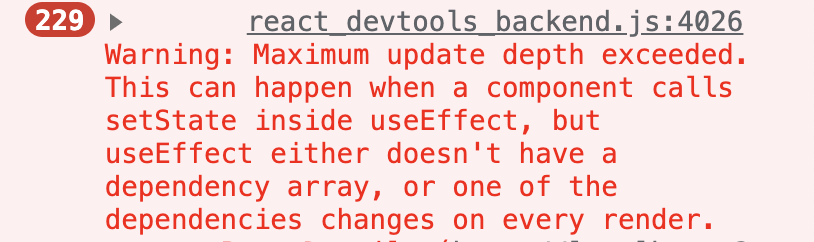
In this guide, we’ll break down the common causes of the ‘maximum update depth exceeded’ problem and provide clear, actionable solutions. We will explore scenarios ranging from simple state updates to complex interactions involving streaming custom data and generative user interfaces. By the end, you’ll be equipped to resolve this error and prevent it in your future projects.
Table of Contents:
- Understanding the ‘Maximum Update Depth Exceeded’ Error
- Common Causes of an Update Depth Exceeded Error
- How the Vercel AI SDK Can Influence This Error
- How to Fix the Maximum Update Depth Exceeded Error
- Advanced Techniques for Complex Scenarios
- Debugging Tools and Techniques
- Conclusion
Understanding the ‘Maximum Update Depth Exceeded’ Error
The ‘Maximum update depth exceeded’ error occurs when a React component enters an infinite loop of re-renders. A component update triggers another update, which in turn triggers yet another, creating a cycle. To prevent the browser from crashing, React sets a limit on the number of re-renders, and when this update depth is exceeded, it throws this specific error.
Imagine a feedback loop where a microphone picks up the sound from a speaker and amplifies it, creating a high-pitched squeal. This is what happens in your application’s code; a state change “feeds back” into itself, causing an uncontrolled cascade of updates. This core concept of error handling is vital for stable application development.
The usual suspects are state updates placed incorrectly within the component lifecycle, such as inside the main body of a function component or within a useEffect hook with improper dependencies. These misplaced updates cause the component to re-render endlessly. This problem can be subtle, especially when managing complex state from sources like the vercel ai sdk.
Common Causes of an Update Depth Exceeded Error
Let’s look at some frequent reasons you might encounter this error, especially when working with AI elements and dynamic content. Recognizing these patterns is the first step toward writing cleaner, error-free code.
1. Direct State Updates in the Render Phase
Placing a state update function (like setState) directly in the main body of a component is a guaranteed way to cause an infinite loop. The component renders, the state is updated, and this update immediately triggers another render. This cycle repeats until React intervenes and shows the ‘maximum update depth exceeded’ error.
The Problem:
<code>import React, { useState } from 'react';

function BrokenComponent() {
  const [count, setCount] = useState(0);

  // Incorrect: State update is called directly in the render body
  setCount(count + 1); // ❌ This causes an infinite loop

  return <div>The count is {count}</div>;
}</code>In this example, every render calls setCount, which triggers another render, creating a loop.
This is often a mistake made by developers new to React’s lifecycle. All state updates should be triggered by events, like a button click, or managed within lifecycle hooks like useEffect. The render phase must remain pure and free of such side effects.
2. Flawed useEffect Dependency Arrays
The useEffect hook is powerful for handling side effects, but its dependency array requires careful management. If you update state inside a useEffect but fail to provide a correct dependency array, you can create a re-render loop. For example, omitting the array causes the effect to run after every single render, leading to the problem.
Similarly, including an object or function in the dependency array that is recreated on every render will also cause the effect to run repeatedly. This is a common pitfall when fetching data or interacting with the sdk core. Correctly specifying dependencies is critical for proper loop control.
The Problem:
import React, { useState, useEffect } from 'react';

function DataFetcher({ options }) {
  const [data, setData] = useState(null);

  useEffect(() => {
    // This effect runs every time 'options' changes.
    console.log('Fetching data with new options...');
    // In a real app, a fetch call would be here.
  }, [options]); // ❌ 'options' is an object, likely new on every parent re-render

  return <div>...</div>;
}
If the parent component re-creates the options object on every render, this useEffect will run infinitely.
3. Props That Change on Every Render
A parent component might pass props, such as objects, arrays, or functions, to a child component. If the parent re-creates these props on every one of its own renders, the child component will perceive them as new props and re-render as well. This can trigger a chain reaction, especially if the child component has a useEffect hook that depends on these props.
This issue often stems from defining objects or functions directly within the parent’s render body. We’ll explore how memoization techniques can solve this problem. It is a frequent challenge when building generative user interfaces that receive complex data structures.
The Problem:
import React, { useState } from 'react';

// Child component that depends on a function prop
function ChildComponent({ onButtonClick }) {
  useEffect(() => {
    console.log('Button click handler changed!');
  }, [onButtonClick]);

  return <button onClick={onButtonClick}>Click me</button>;
}

// Parent component
function ParentComponent() {
  const [count, setCount] = useState(0);

  // ❌ This function is recreated on every single render of ParentComponent
  const handleClick = () => {
    console.log('Button was clicked');
  };

  return (
    <div>
      <p>Count: {count}</p>
      <button onClick={() => setCount(count + 1)}>Increment</button>
      <ChildComponent onButtonClick={handleClick} />
    </div>
  );
}
Here, ChildComponent‘s useEffect runs every time ParentComponent re-renders because handleClick is a new function every time.
How the Vercel AI SDK Can Influence This Error
When working with the vercel ai sdk, the likelihood of encountering this error can increase due to the nature of handling AI-generated content. Streaming text, handling tool usage, and managing chatbot message persistence involve frequent and complex state updates. Without proper workflow patterns, these can easily lead to render loops.
For example, when using hooks like useChat, you receive a stream of messages. If your logic for processing these chatbot resume streams is inside a useEffect with incorrect dependencies, you might trigger updates on every chunk of data received. This rapid succession of updates can easily exceed the maximum update depth.
Furthermore, building agents that perform tool calling or object generation requires managing multiple asynchronous operations and their resulting state changes. The state representing the model’s thoughts, actions, and observations is constantly in flux. Improperly connecting this state to your UI components from ai elements ai is a common source of the ‘update depth exceeded’ error.
How to Fix the Maximum Update Depth Exceeded Error
Now that we understand the causes, let’s focus on practical solutions. These fixes revolve around respecting React’s data flow and lifecycle. Implementing them will help you manage state effectively, especially when generating text or generating structured data with a language model.
1. Move State Updates Out of the Render Body
The most important rule is to never call a state setter directly within the render scope of your component. Instead, these updates should be triggered by user interactions or other events. Use event handlers like onClick or onChange to modify state in response to user actions.
For side effects that are not tied to a direct user event, the useEffect hook is the correct place. For example, if you need to fetch data when the component mounts or when a specific prop changes, useEffect allows you to do so safely without causing an infinite render loop. This separation of concerns is fundamental.
Here’s a quick comparison of incorrect vs. correct state updates:
| Scenario | Incorrect Approach (Causes Loop) | Correct Approach |
|---|---|---|
| Initial Data Load | Calling fetchData() directly in render. | Calling fetchData() inside useEffect with an empty dependency array []. |
| User Click | Updating state in render based on a prop. | Updating state inside an onClick handler function. |
| Prop Change | Updating component state in render based on a prop value. | Using a useEffect hook that lists the prop in its dependency array. |
import React, { useState, useEffect } from 'react';

function FixedComponent() {
  const [count, setCount] = useState(0);

  // ✅ Correct: State update is managed inside a useEffect hook
  useEffect(() => {
    // This logic now runs only once after the initial render
    setCount(1);
  }, []); // Empty dependency array means it runs once

  // An update based on user interaction
  const handleIncrement = () => {
    setCount(prevCount => prevCount + 1);
  };

  return (
    <div>
      <p>The count is {count}</p>
      <button onClick={handleIncrement}>Increment</button>
    </div>
  );
}2. Use useCallback and useMemo for Stable Props
To prevent props from changing on every render, you can use the useCallback and useMemo hooks. useCallback will return a memoized version of a function that only changes if one of its dependencies has changed. This is perfect for passing stable event handlers to child components.
Similarly, useMemo will memoize the result of a calculation. If you are creating a complex object or array to pass as a prop, wrap its creation in useMemo. This ensures that the child component only re-renders when the data used to create the object actually changes, not just because the parent re-rendered.
3. Properly Manage useEffect Dependencies
Pay close attention to the dependency array of your useEffect hooks. Only include values that should trigger the effect to re-run when they change. If your effect doesn’t need to re-run, provide an empty array [] to ensure it only runs once after the initial render.
The Solution:
import React, { useState, useEffect, useMemo } from 'react';

function FixedDataFetcher({ options }) {
  const [data, setData] = useState(null);

  // ✅ Correct: If you can't control the parent, serialize the object to a stable string.
  const optionsString = JSON.stringify(options);

  useEffect(() => {
    console.log('Fetching data with new options...');
    // The effect now only runs when the content of 'options' changes.
  }, [optionsString]);

  return <div>...</div>;
}

// Or better, fix it in the parent with useMemo:
function Parent() {
    const options = useMemo(() => ({ setting: 'value' }), []);
    return <FixedDataFetcher options={options} />;
}4. Throttle Rapid State Updates (Vercel AI SDK and More)
In scenarios involving streaming data, like with the Vercel AI SDK, state updates can occur in such rapid succession that they overwhelm React’s render cycle. Throttling these updates is an effective strategy to prevent this.
For the Vercel AI SDK, there is a built-in solution. The useChat and useCompletion hooks accept an experimental option to throttle updates 1:
// For useChat
const { messages, ... } = useChat({
  // Throttle the messages and data updates to 50ms:
  experimental_throttle: 50
});

// For useCompletion
const { completion, ... } = useCompletion({
  // Throttle the completion and data updates to 50ms:
  experimental_throttle: 50
});
For other situations where rapid updates are the culprit, you can implement custom throttling using a library like Lodash or by creating a custom hook. This involves batching state updates so they don’t happen more frequently than a specified interval (e.g., every 50-100ms), giving React enough time to handle renders gracefully.
The eslint-plugin-react-hooks package is an invaluable tool for this. It includes a rule (exhaustive-deps) that warns you about missing or incorrect dependencies in your useEffect calls. Listening to these warnings can prevent many hard-to-debug infinite loops and is a best practice for all React development, especially within an App Router environment.
Advanced Techniques for Complex Scenarios
For more intricate applications, such as those involving chatbot tool usage or complex UI state, you may need more advanced patterns. These techniques provide better control over component updates and state management.
1. Using useReducer for Complex State Logic
When a component has complex state logic with multiple sub-values or when the next state depends on the previous one, the useReducer hook can be a better choice than useState. It decouples the state update logic from the component, making it easier to manage and test. By dispatching actions instead of calling multiple state setters, you can prevent intermediate re-renders that might contribute to a loop.
This is especially helpful for managing state from uimessage streams or reading uimessage streams of vercel AI SDK. The reducer can handle different types of incoming messages or data chunks from stream protocols, updating a single state object in a predictable way. This helps avoid the ‘maximum update depth’ error that can occur from multiple, conflicting useState updates.
2. Leveraging a State Management Library
For large-scale applications, managing state with just React’s built-in hooks can become difficult. Libraries like Redux, Zustand, or Jotai provide a centralized store for your application’s state. This global state can be accessed by any component without needing to pass props down through many layers (prop drilling).
Using a state management library can prevent re-render loops caused by prop changes. Components subscribe only to the parts of the state they need, and they only re-render when that specific data changes. This approach is beneficial when managing things like message metadata or session-wide context in an AI application.
Debugging Tools and Techniques
When you’re facing a stubborn ‘maximum update depth exceeded’ error, these tools can help you find the root cause. Effective debugging involves more than just guessing; it requires systematically tracing the flow of updates in your application.
1. The React DevTools Profiler
The React DevTools browser extension is essential for debugging. Its Profiler tab lets you record rendering activity in your application. When you encounter the error, you can start the profiler, reproduce the issue, and then analyze the recording to see which component is re-rendering excessively.
The flame graph and ranked charts in the Profiler will highlight the components that are taking the most time to render or are rendering most often. This visual feedback makes it much easier to pinpoint the source of an infinite loop. You can also inspect a component’s props and state at different points in time.
2. Strategic Console Logging
While it may seem simple, strategic use of console.log is a powerful debugging technique. Place log statements inside the body of your components to see how often they render. You can also log props and state values to see what is changing on each render.
To go deeper, use console.log inside your useEffect hooks to understand when they are being triggered. This can quickly reveal if a dependency is changing unexpectedly. Combining logs with the browser’s debugger allows you to pause execution and inspect the entire application state.
Conclusion
The ‘Maximum update depth exceeded’ error is a common hurdle in React development, especially when working with dynamic tools like the Vercel AI SDK. However, it’s almost always caused by a misunderstanding of React’s rendering lifecycle. By ensuring state updates are handled in event handlers or useEffect and by stabilising props with memoization, you can effectively resolve this issue.
Keep your components free of side effects in their render phase, carefully manage your hook dependencies, and use the right tools for debugging. Adopting these best practices will not only fix the ‘maximum update depth’ error but also lead to more predictable and performant React applications.
By following these guidelines, you’ll spend less time fighting with infinite loops and more time building amazing user experiences. Happy coding.
Tags: reactjs
About Me

Pankil Joshi
Coder/Writer
I’m in love-hate relationship with coding.
PS: AI is going to take over for sure.
Follow Me
Connect with me and be part of my social media community.
Leave a Reply